
I still remember the day I lost my trusty notebook. Panic set in as I realized years of ideas, meeting notes, and to-do lists had vanished. That moment sparked my journey into the world of digital note-taking apps, and I’ve never looked back. These productivity tools have become my second brain, capturing fleeting thoughts and transforming them into actionable plans.
As a freelance writer juggling multiple projects, I’ve found that the right note-taking app can be a game-changer for organization and efficiency. Whether you’re a student, professional, or business owner, the ability to access your digital notes across devices can boost productivity and keep you on track.
In my quest for the perfect note-taking solution, I’ve explored countless options. Some standouts include ClickUp, which boasts an impressive 4.7/5 rating on both G2 and Capterra, based on thousands of user reviews1. For those seeking AI-powered assistance, ClickUp Brain offers advanced note-taking features for a modest monthly fee1.
But it’s not just about ratings. I’ve found that the real value lies in how these apps integrate into our daily workflows. For instance, Hive has been praised by professionals for its time-saving features like task tracking and direct messaging, which can significantly reduce the need for constant status updates2.
In this article, we’ll dive into the top note-taking apps of 2024, exploring their unique features and helping you find the perfect fit for your needs. From the simplicity of Simplenote to the comprehensive workspace of Notion, we’ll cover a range of options to streamline your digital note-taking experience.
Why Note-Taking Apps Are Essential for Productivity
Note-taking apps have changed the game for productivity. They let us capture, organize, and access information in new ways. With many options, these apps let us create notes, add attachments, and work together3.
The Impact of Organized Notes
Organized digital notes are key to efficient work. Using note-taking apps helps keep things tidy and easy to find3. Just 10 minutes a day keeps my digital space clean4.
This keeps me on track with my tasks and ideas.
Reducing Mental Clutter
Note-taking apps cut down mental clutter. They make finding information fast with advanced search5. AI helps summarize and find keywords, saving time and energy5.
It’s like having a personal assistant for my thoughts.
Enhancing Collaboration
Collaboration gets easier with note-taking apps. They let us edit and share in real-time3. These tools have boosted productivity in many fields5.
They help us work better together.
But, finding the right app is key. Switching too often can slow us down4. So, I stick with one app all year, mastering its features.
Features to Look for in Note-Taking Apps
I’ve tried many note-taking apps and found some key features. These features are crucial for boosting productivity. It’s important to see how the app fits into your workflow and works with other tools6.
User-Friendly Interface
A clean, easy-to-use interface is essential. I prefer apps with customizable layouts and simple navigation. This lets me organize my thoughts fast without getting lost in menus.
Integration with Other Tools
Working smoothly with other tools is a big plus. For example, Microsoft OneNote has AI features like Copilot. These features help with text creation and summaries, making it better for Microsoft 365 users6. This integration can really improve your workflow.
Cross-Platform Availability
Being able to access your notes on any device is key. The best apps sync well. For instance, OneNote uses OneDrive for storage, giving you 5GB to start. This lets me get to my notes from anywhere6. It’s great for students and professionals who need to store and share information efficiently7.
When picking a note-taking app, think about these features to boost your productivity. The right app can change how you handle information and tasks. It makes your digital life more organized and efficient.
Top Note-Taking Apps: A Quick Overview
I’ve looked into many note-taking apps to make my work easier. These tools help me organize my thoughts and work better. Let’s look at some popular ones that meet different needs.
Evernote: A Classic Contender
Evernote has been a favorite since 2008. It’s known for its strong features, but free users now have limits. They can only have 50 notes and one notebook8. Still, its search and organization tools are great for taking lots of notes.
Microsoft OneNote: Versatile and Powerful
Microsoft OneNote is very versatile. It’s free and lets me make notes in many ways. I can sync them across Microsoft apps and organize them well8. It’s a big help for getting work done.
Notion: All-in-One Workspace
Notion is a standout as an all-in-one workspace. It has customizable templates and works for both personal and team projects. I like how it lets me create databases, wikis, and project boards, along with notes.
For those who like writing by hand, Nebo is a special choice. It supports 66 languages and turns handwritten notes into digital text. It also has AI features for PDFs9. At $9, it’s a good pick for digital pen users.
When picking a note-taking app, think about what you need. Evernote is great for organizing, OneNote is versatile, Notion is customizable, and Nebo focuses on handwriting. Check out this guide for more on comparing note-taking apps.
How Evernote Can Transform Your Note-Taking
Evernote is a real game-changer in the digital notes world. I’ve tried many note-taking apps, but Evernote always impresses me with its power and versatility10.
Key Features of Evernote
Evernote has a lot to offer. You can make digital notebooks for each class or project, making it easy to organize11. You can add text, photos, audio, and videos to your notes, helping different learning styles11.
Evernote’s search function is a big plus. You can search everything in your notes, including text in images, thanks to OCR technology1011. This means you’ll never miss important info again.
My Top Tips for Using Evernote
Here are some tips to get the most out of Evernote:
- Use the web clipper to save online content directly to your notebooks
- Set reminders for important tasks and deadlines
- Collaborate on group projects by sharing notes with classmates or colleagues
- Sync your notes across devices for easy access anywhere
By using these tips, you can change how you take notes and increase your productivity. Evernote makes staying organized a breeze11.
Microsoft OneNote: A Closer Look
I’ve been using Microsoft OneNote for a while now. It’s really versatile for making digital notes. It’s my top choice for both personal and work projects. Here are some cool features and how it helps teams work together.
Unique Features of OneNote
OneNote’s infinite canvas is amazing. I can add text, images, or voice recordings anywhere on the page. This makes taking notes easier and more flexible1213. The app also organizes my notes well. It puts them into sections and pages, making it easy to find what I need13.
OneNote works great with other Microsoft Office apps. It’s easy to add Excel spreadsheets or Word documents to my notes14. The tagging system helps me sort and prioritize my notes fast. This makes it simple to keep track of tasks1213.
Benefits of Using OneNote for Team Projects
OneNote is great for teamwork. I can share notebooks with my team, so we can work together live1213. This has been super helpful for brainstorming and planning projects. Everyone can access our notes, no matter what device they use121314.
For work, OneNote keeps our notes safe. When I save notes to OneDrive for Business, our company’s Office 365 account protects them14. The search function is also a big time-saver. It helps me find what I need quickly in all my notes1213.
Microsoft OneNote has changed how I handle digital notes and team work. Its special features and easy connection with other Microsoft tools make it a key tool for improving our workflow.
Exploring Notion for Comprehensive Note Management
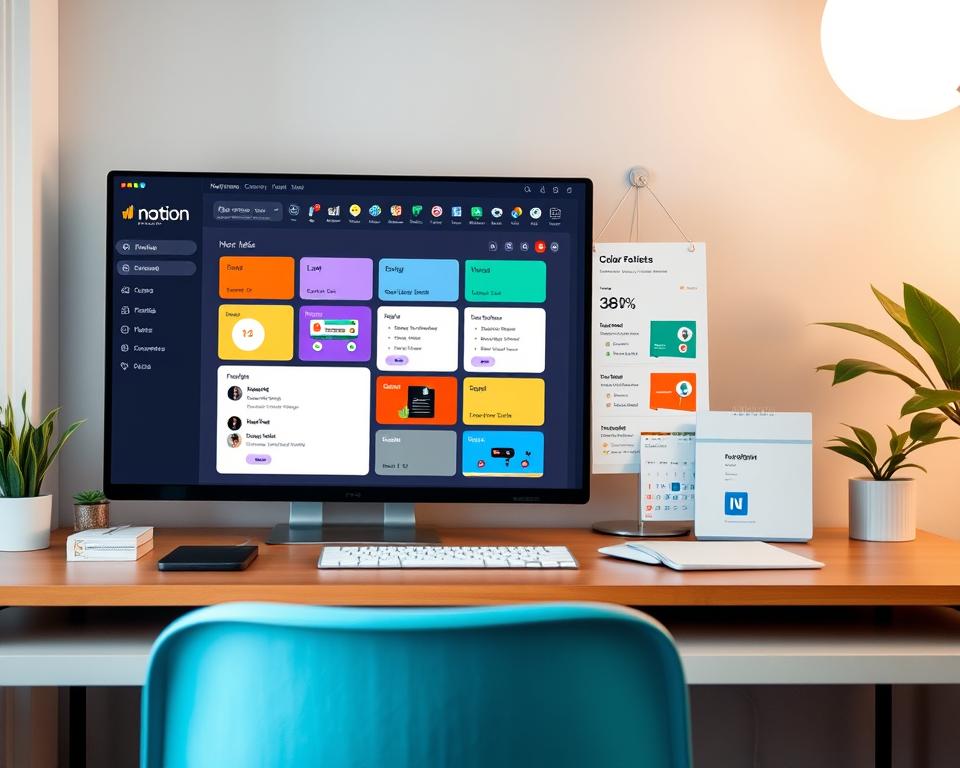
Notion is a top choice for managing digital notes and tasks. It has changed how I organize my life. You can make your own workspace in Notion, fitting your needs perfectly.
Customization Options in Notion
Notion lets you add many types of content to your notes15. You can include videos, audio, and PDFs. This makes taking notes more fun and useful. Plus, there are many templates to help you get started quickly15.
For learning Notion, I watch video tutorials. They are usually 3 to 10 minutes long, averaging 6.25 minutes16. If you like reading, guides are about 8.25 minutes long, with the longest one taking 12 minutes16.
Why Notion Works for Both Personal & Professional Use
Notion is great for both work and personal life. You can invite team members to work together on pages15. For personal use, using keyboard shortcuts like Ctrl + / can make you more efficient15.
It’s important to focus on clear notes rather than many15. Keeping your notes organized helps you find information quickly15. With 15 different content types to explore, Notion is a full-featured tool for managing your digital life16.
Google Keep: Simplicity Meets Functionality
Google Keep is a simple digital notes app with great features. It’s easy to use and perfect for quick notes and organization.
Ideal Use Cases for Google Keep
Google Keep is best when you need speed and simplicity. It’s perfect for jotting down ideas, making shopping lists, or capturing thoughts during meetings. The app has voice notes that automatically turn into text, making it great for capturing ideas on the go17.
It’s also great for teamwork. You can invite others to see and add to your notes. Everyone can edit at the same time, making teamwork easier18.
My Favorite Google Keep Features
Google Keep has AI features that make it stand out. Here are some features I love:
- Color-coding notes for quick differentiation between topics
- Custom labels for grouping related notes
- Pinning important notes for easy access
- Archiving to declutter the main view
- Integration with Google Drive and Google Assistant18
The app’s AI helps a lot. It recognizes voice, suggests ideas, and reads text from images. These features make organizing notes easy17.
Google Keep is easy to use and works well with other Google services. It’s a key tool for managing digital notes and staying organized in today’s fast world.
Bear: A Minimalist Approach to Note-Taking
Bear is a sleek digital notes app that loves simple design. After a year off, Bear 2.0 launched in March 2023. It brings new features to make note-taking better19.
Bear’s Tagging System Explained
I really like Bear’s tagging system. It lets you nest tags for easy organization19. This way, I can sort my notes into topics, subtopics, and more.
The search function in Bear is amazing. You can find notes by keyword, tag, or even in PDFs and images20. It makes finding information fast, even with lots of notes.
Why I Love the Aesthetic of Bear
Bear’s design is clean and beautiful. It helps me write without distractions. The latest update lets me resize images and use Apple Pencil for notes, adding a personal touch19.
Bear works great on Mac and iOS devices, and it syncs well across them20. I often jot down ideas on my Apple Watch, and they update on all my devices.
Bear is versatile in how it lets you share notes. You can export them in Markdown, PDF, and ePub19. This makes Bear a must-have for my daily notes.
How to Choose the Right Note-Taking App for You
Finding the right note-taking app can be hard. With so many choices and a market expected to hit $1.35 billion by 2026, it’s easy to get lost2122. The trick is to think about what you need and try out a few before you decide.
Assessing Your Personal Needs
People take notes in different ways. You might be an architect who likes things organized, a gardener who connects ideas, a librarian who organizes knowledge, or a student who wants something simple23. Knowing your style helps you choose.
When picking a note-taking app, think about:
- User interface and layout
- Organization features
- Integration with other productivity tools
- Syncing capabilities between devices
- Pricing (some apps cost over $50 annually)22
Testing Multiple Options
It’s a good idea to try out different apps before you make a choice. Many offer free trials or have free versions. Evernote, Bear, Obsidian, and Craft are popular choices22. Each is good for different needs – Notion for architects, Roam for gardeners, and OneNote for librarians23.
Look for features like bi-directional linking, visual mapping, or spaced repetition. Take your time to see what works best for you21.
Best Practices for Effective Note-Taking
Mastering note-taking can really boost your productivity. Let’s explore some top practices to get the most out of your apps and improve your organization.
Organizing Notes Efficiently
Keep your digital space clean by using tags and folders. This combo makes finding notes easy and keeps clutter away. Note-taking apps offer six types of notes, each for a different use24. Organizing your notes this way makes your system flexible and strong.
Regularly Reviewing Your Notes
Don’t let your notes get old and dusty! Make time to review and update them often. This helps solidify your learning and spot areas needing more focus. Good notes are great for studying and planning projects25. Treating most notes as temporary helps you think more creatively24.
Leveraging Multimedia in Notes
Modern note-taking apps are great for adding multimedia. I like attaching files, embedding photos, and sketching in my notes24. This multi-sensory approach makes complex topics easier to understand25. For meeting notes, include date, attendees, agenda, and action points26. Mixing text with visuals creates a detailed, easy-to-review record.
FAQ
What are the key benefits of using note-taking apps?
Which features should I prioritize when choosing a note-taking app?
Can you recommend some popular note-taking apps?
How does Evernote compare to other note-taking apps?
What makes Microsoft OneNote stand out?
How does Notion differ from traditional note-taking apps?
Is Google Keep suitable for complex note-taking needs?
What makes Bear a good choice for writers and creatives?
How can I maximize the benefits of my chosen note-taking app?
Are there any privacy concerns with using note-taking apps?
Source Links
- https://clickup.com/blog/note-taking-apps/ – 10 Best Note-Taking Apps in 2024 (Free & Paid)
- https://hive.com/blog/best-note-taking-apps/ – 17 Best Note Taking Apps Of 2024 | Free & Paid Tools
- https://scholarly.so/blog/boost-your-productivity-and-organization-with-the-best-note-taking-apps – Boost Your Productivity and Organization with the Best Note Taking Apps – Scholarly Blog
- https://medium.com/@danielasgharian/find-stability-in-your-notes-treat-your-app-like-your-house-993d929a5e30 – Find Stability in Your Notes: Treat Your App Like your House
- https://www.eric.ai/blog/boost-your-productivity-with-ai-note-taking-apps-for-professionals – Boost Your Productivity With AI Note-Taking Apps for Professionals | Eric.ai
- https://zapier.com/blog/best-note-taking-apps/ – The 6 best note taking apps in 2024 | Zapier
- https://academictechnologies.it.miami.edu/explore-technologies/technology-summaries/note-taking-applications/index.html – Note-Taking Applications | Academic Technologies
- https://www.theverge.com/23942597/notes-text-evernote-onenote-keep-apps – The best note-taking apps for collecting your thoughts and data
- https://www.zdnet.com/article/best-note-taking-app-for-ipad/ – The best note-taking apps for iPad of 2024: Expert tested
- https://blog.alexanderfyoung.com/i-was-wrong-evernote-vs-notion-vs-other-note-taking-apps/ – I Was WRONG! Evernote vs Notion vs Other Note Taking Apps
- https://www.additudemag.com/evernote-best-note-taking-app-adhd-college-freshman/ – Q: “My Overwhelmed College Freshman Needs Help Managing Her Notes”
- https://support.microsoft.com/en-us/office/introducing-onenote-38be036d-5b5a-49ad-83be-292fe53ad7b3 – Introducing OneNote – Microsoft Support
- https://support.microsoft.com/en-us/office/what-is-onenote-be6cc6cc-3ca7-4f46-8876-5000f013c563 – Introducing OneNote – Microsoft Support
- https://play.google.com/store/apps/details?id=com.microsoft.office.onenote – Microsoft OneNote: Save Notes – Apps on Google Play
- https://www.thebricks.com/resources/how-to-take-notes-in-notion-a-comprehensive-guide – How to Take Notes in Notion: A Comprehensive Guide
- https://www.notion.so/help/guides/category/notes – Notes
- https://www.analyticsinsight.net/artificial-intelligence/google-keep-vs-other-note-taking-apps-how-ai-gives-it-an-edge – Google Keep vs. Other Note-Taking Apps: How AI Gives It an Edge
- https://www.growthtactics.net/google-keep-review/ – Google Keep Review: A Closer Look at Simplicity and Functionality
- https://medium.com/@paralloid/can-bear-2-0-be-the-note-taking-king-fc4b344e9d32 – Can Bear 2.0 Be The Note-Taking King?
- https://robertbreen.com/2024/02/23/bear-2-for-writing-and-thinking/ – Bear 2 for Writing and Thinking – Robert Breen
- https://nesslabs.com/how-to-choose-the-right-note-taking-app – How to choose the right note-taking app
- https://medium.com/@dryhwong/battle-of-the-note-taking-apps-how-to-pick-the-right-note-taking-app-that-suits-your-needs-fa03d394ab34 – Battle of the Note-taking apps. How to pick the right Note-taking app that suits your needs?
- https://fortelabs.com/blog/the-4-notetaking-styles-how-to-choose-a-digital-notes-app-as-your-second-brain/ – The 4 Notetaking Styles: How to Choose a Digital Notes App as Your Second Brain – Forte Labs
- https://cameron-sea.medium.com/a-comprehensive-approach-to-personal-note-taking-babdce778b74 – A Comprehensive Approach to Personal Note-taking
- https://studentlearningcenter.appstate.edu/resources/note-taking – Mastering the Art of Effective Note-Taking
- https://zapier.com/blog/note-taking-methods/ – The 5 best note-taking methods for more effective notes | Zapier